Deleting Data Assets
The delete functionality allows you to permanently remove a data asset that is no longer required. You can delete assets that are obsolete, incorrectly created, duplicated, or no longer maintained. Deleting unused assets helps keep the data catalogue organized and relevant.
Deleting a data asset can affect users, reports, and processes that rely on the asset. Before deleting a data asset, review the following considerations:
-
Verify that the asset is no longer needed.
-
Confirm that no active consumers depend on the asset.
-
Review downstream dependencies.
-
Ensure that important information is archived if required.
-
Review governance and retention policies.
To delete a data asset
-
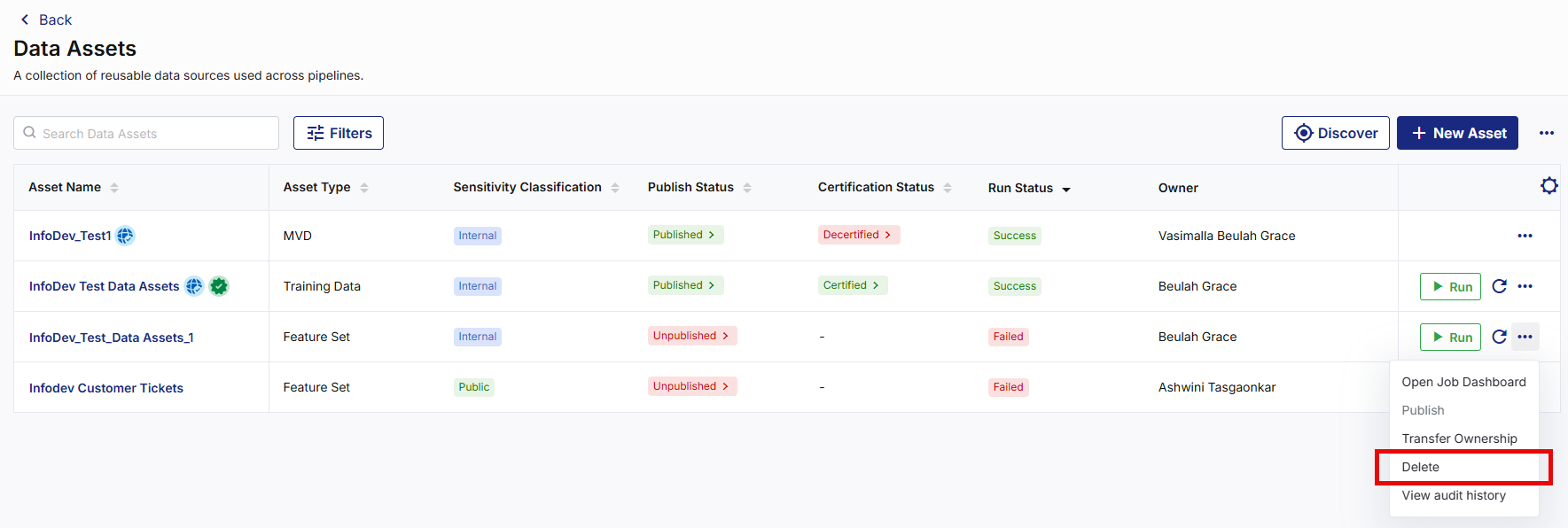
Navigate to Data Assets and search for the data asset you want to delete.
-
From the ellipsis (…) next to the data asset, click Delete. A confirmation dialog box appears.

-
Review the confirmation message, then click Delete. The data asset is removed from the record, and the deletion activities are recorded in the audit logs. When a data asset is deleted:
-
The asset no longer appears in the Data Assets list.
-
Users can no longer access the asset details.
-
The asset is no longer available for discovery.
-
Consumers can no longer use the asset.
-
Related access paths become unavailable.
-
|
What's next?Audit Logs and Activity Tracking |
 Recommended Topics